
How it works
Open Portfolio in the left rail for the full book: every venue, the total, and the Deposit, Transfer, Withdraw, and History actions. The page is documented in Portfolio Overview. This page covers the same view from chat.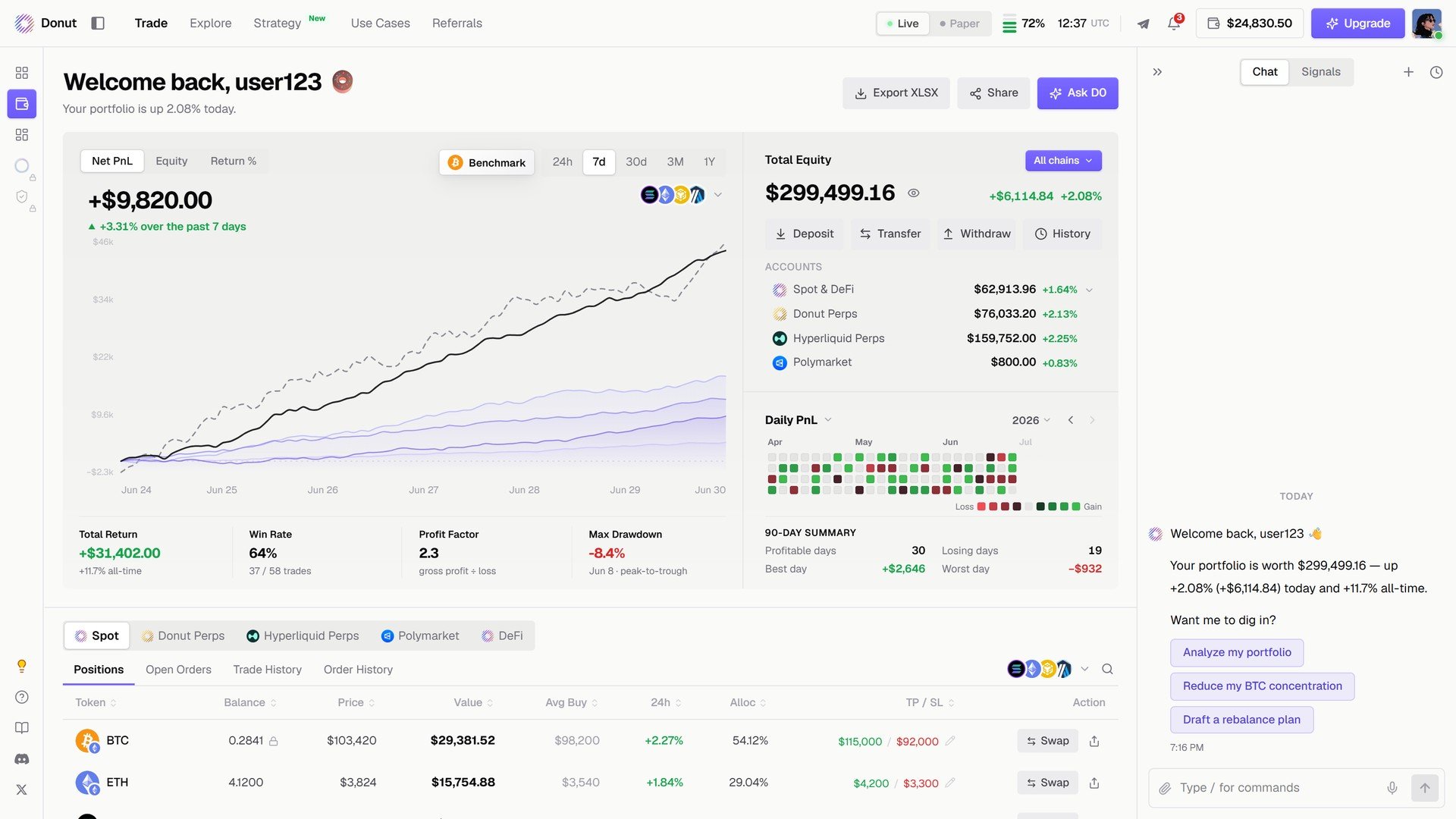
The Portfolio page.
- What’s my balance?
- Show my positions
- How’s my portfolio doing?
What you’ll see
Full portfolio view (wallet + perps)
One question shows everything at once.You: “What’s my balance?” D0: “Wallet: $14,280You get your full wallet breakdown with 24-hour price changes, plus your perps account balance and margin usage, everything in one message.Perps Account: Equity: $5,200 · Available: $3,800 · Margin used: $1,400 Total: $19,480”
Wallet only
If you just want to see your wallet without perps data, ask for it specifically.You: “Just show my wallet” D0: (shows only wallet tokens without perps data)
DeFi positions
Check what you’ve got deposited or borrowed across protocols. The same rows are in the DeFi tab under the chart.You: “Show my DeFi positions” D0: “Your DeFi portfolio: Kamino: Deposited 1,000 USDC (APY 8.2%) · Borrowed 200 USDC (APR 12.5%) · Health 2.8 Meteora LP: SOL/USDC: $2,400 value, $45.20 fees (24h) Total DeFi: $3,245”You see exactly what’s earning yield, what you’ve borrowed, and how safe your positions are.
Perps positions
Get a clean view of all your open leveraged positions with live PnL. The same rows are in the Donut Perps and Hyperliquid Perps tabs under the chart.You: “Show my perps positions” D0: “Open positions:Shows you where you’re positioned, your entry prices, current prices, and how much you’re up or down.Unrealized PnL: +$121.00”
A risk read
On the Portfolio page, Ask D0 gives a read of the whole book: concentration, open risk, what to watch. In chat, the same request is Analyze my portfolio, and the answer ends in actions such as Reduce my BTC concentration and Draft a rebalance plan.Your wallet
There is nothing to connect. D0 creates a non-custodial wallet for you at sign-up, covering Solana and the EVM chains, and funds every venue account from it. See Your Wallet and Accounts & Fund Isolation.Tips for tracking your portfolio
- Ask for the balance for the full picture. It returns wallet plus perps data in one answer, so you see everything at once.
- Check your perps margin regularly. Especially during volatile markets when prices are moving fast. You want to know if you’re getting close to liquidation.
- Monitor DeFi health factors. If you’re borrowing on Kamino, keep your health factor above 2.0. Below that you’re starting to get into risky territory.
- Check after big trades. See how your allocation shifted after entering or exiting positions. Did you go heavier into one token than you meant to? A quick balance check shows you.
- Combine with analysis. If you see a token is up or down big in the last 24 hours, ask D0 to analyze why it moved.
- Export when you need records. Export XLSX on the Portfolio page downloads your trading records for filing or your accountant.